


Key Takeaways
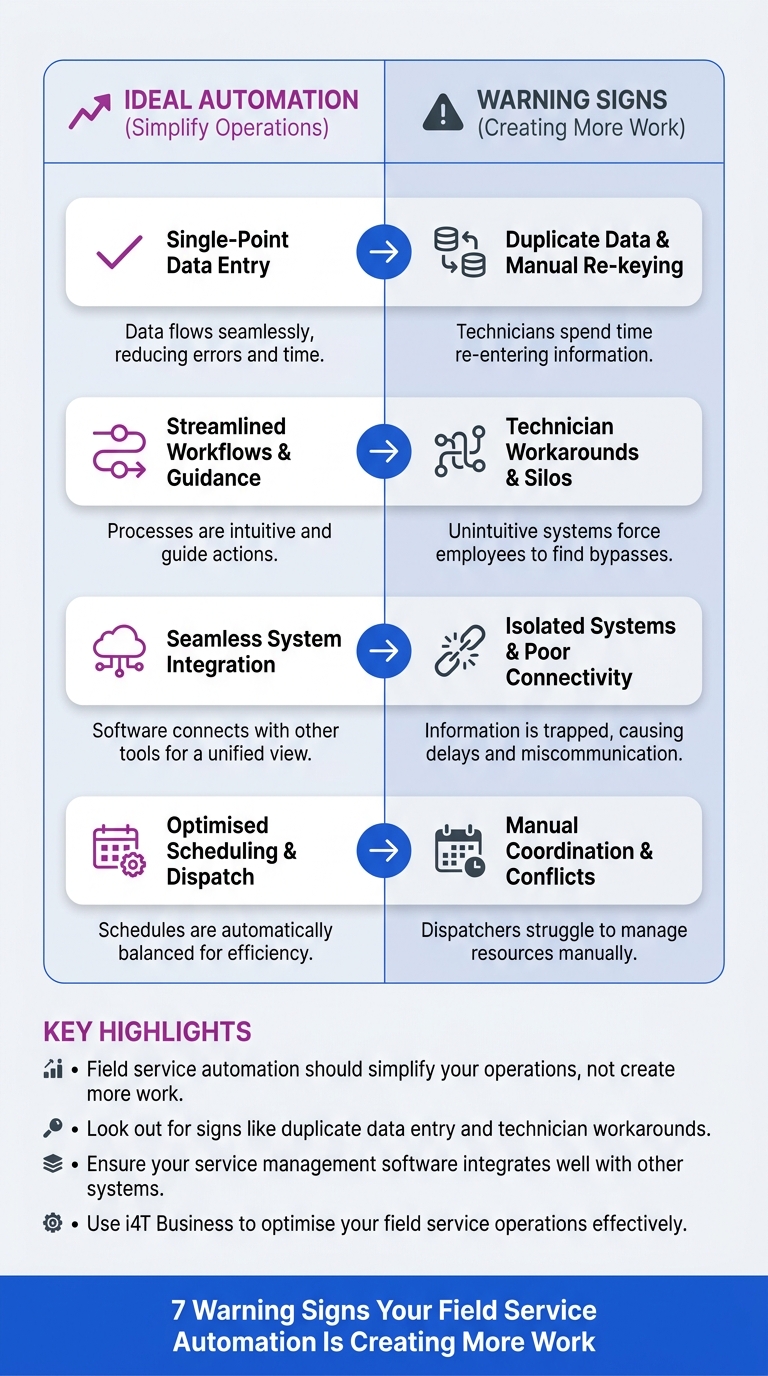
Field service automation should simplify your operations, not create more work.
Look out for signs like duplicate data entry and technician workarounds.
Ensure your service management software integrates well with other systems.
Use i4T Business to optimise your field service operations effectively.
Key Answer
Learn how to identify inefficiencies and streamline operations with effective field service management.
As a tradie in Australia, you’re always looking for ways to streamline your operations and reduce inefficiencies in the field. However, if your field service automation is creating more work than it’s saving, it’s time to take a closer look. Identifying these signs early can help you avoid unnecessary admin, delays, and frustration.
Field service software and field service management should simplify your workflows, not complicate them.
Unfortunately, poorly designed service management software can lead to issues such as duplicate data entry, technician workarounds, and unreliable reporting.
Let’s explore these challenges and how you can optimise your operations.
Why Automation Should Make Work Easier
Automation in field service management is designed to improve efficiency, accuracy, and customer satisfaction. It should eliminate repetitive tasks, reduce manual errors, and provide real-time data access. When implemented correctly, automation transforms how tradies operate by freeing up time and resources for more critical tasks.
For instance, well-integrated field service software enables seamless communication between the office and field workers, helping teams access the most up-to-date job information. Yet, if these systems are not set up correctly, they can become a source of frustration rather than a solution. This is why understanding the core purpose of automation is essential for any business.
Your Team Is Entering Information Twice
One of the clearest signs that your field service software is creating more work is when your team finds themselves entering the same information multiple times. This is not just a time-waster but also a potential source of errors.
Duplicate data entry often arises from poorly integrated systems where field service management and backend systems don’t communicate effectively. This issue can be particularly troublesome in sectors like electrical, plumbing, or HVAC, where detailed job specifications and client information must be consistently accurate.
To combat this, ensure your field service software integrates seamlessly with other business tools, reducing the need for manual re-entry. Leveraging tools that offer comprehensive integration can significantly cut down on redundancy and improve overall operational efficiency.
Technicians Are Creating Their Own Workarounds
When technicians start devising their own methods to accomplish tasks, it’s a red flag that your service management software isn’t user-friendly or efficient. These unofficial workarounds can lead to inconsistencies, errors, and a lack of accountability.
Take, for instance, the scenario in a fire safety maintenance business where technicians skip steps in the official workflow to save time. This not only jeopardises the quality of service but also risks non-compliance with safety regulations.
To address this, involve your team in the selection and testing phases of new software. Their firsthand experience is invaluable in choosing tools that genuinely enhance productivity. Regular training sessions can also ensure they use the systems to their fullest potential.
Simple Jobs Have Become Complicated
When simple tasks turn into complex operations due to convoluted workflows, it’s a clear sign your automation systems need reevaluation. Overly complex processes can stem from poorly structured service management software, leading to longer job times and frustrated staff.
Imagine a cleaning service where a simple booking needs multiple approvals or extensive data input before it can be confirmed. This can delay service delivery and reduce customer satisfaction.
Streamlining your processes by mapping out each step and eliminating unnecessary actions can restore simplicity. Use field service software that allows for customisable workflows to suit your specific needs without overcomplicating simple tasks.
Customers Still Need to Chase Updates
A major advantage of using field service management is improved customer communication. However, if your clients frequently call in for updates, it indicates a gap in your communication strategy.
For security system installers, for instance, timely updates are crucial for customer trust and satisfaction. When clients have to reach out themselves, it suggests your field service software isn’t providing the transparency and communication it promised.
Enhancing this aspect can involve setting up automated notifications and updates through your software. This not only keeps customers informed but also frees up your staff to focus on delivering high-quality service.
Scheduling Changes Are Causing Confusion
Scheduling is the backbone of any field service operation, and changes can cause significant disruption if not handled smoothly. Confusion often arises when field service management systems aren’t agile enough to accommodate changes effectively.
Consider a plumbing business where last-minute schedule tweaks lead to double bookings or miscommunication between office staff and technicians. This not only disrupts your operations but also frustrates your clients.
To counter this, invest in service management software that offers real-time schedule updates accessible to all team members. This ensures everyone is on the same page and can adjust plans seamlessly, reducing downtime and improving service reliability.
Your Reports Can't Be Trusted
If you find yourself questioning the accuracy of your reports, it’s a sign your current systems might not be fit for purpose. Unreliable reporting can stem from inaccurate data collection or flawed software analytics.
In maintenance services, for instance, decisions based on faulty reports can lead to missed opportunities or inefficient allocation of resources. It’s crucial to have dependable data to make informed business decisions.
Implementing a field service software solution that ensures accurate data capture and analysis is vital. Choose software with strong reporting capabilities that can be tailored to your specific metrics and KPIs, ensuring you have a clear picture of your operations at all times.
How to Simplify Your Field Service Automation with i4T Business
Streamlining field service automation with i4T Business can transform your operations. It addresses many pain points discussed, offering features that enhance coordination and ensure efficient field operations.
Embrace software solutions that not only automate but genuinely enhance your field service processes. By making informed choices, you can ensure that your technology investments lead to smarter, more efficient work practices, ultimately benefiting both your business and your clients.
Frequently Asked Questions
Field service automation improves efficiency, reduces manual errors, provides real-time data access, and enhances customer satisfaction.
Ensure your field service software can seamlessly interact with other business tools, reducing the need for manual re-entry and improving overall efficiency.
Workarounds indicate inefficiencies in your system and can lead to errors, inconsistencies, and lack of accountability.
Implement a field service software solution with strong reporting capabilities that ensure accurate data capture and analysis.
i4T Business offers tools that enhance coordination, ensure efficient operations, and reduce workarounds and errors, leading to smarter work practices.