
TL;DR
CRM×FSM is the combination of Customer Relationship Management (CRM) and Field Service Management (FSM) in one connected workflow. It links your customer conversations, quoting, booking, dispatch, onsite job delivery, invoicing, and aftercare so everything runs on the same data—without retyping details or losing context between office and field.
CRM helps you win and keep customers, FSM helps you deliver jobs efficiently, and CRM×FSM removes the messy handover between the two.
If you run a field service business, plumbing, electrical, HVAC, fire services, cleaning, maintenance, you’re not just doing jobs. You’re running a full customer journey: answering enquiries, pricing work, booking jobs, dispatching technicians, keeping customers updated, documenting what happened onsite, sending invoices, and staying top-of-mind so people call you again.
That’s why CRM×FSM is becoming a big deal in 2026. It’s not a buzzword. It’s the practical shift from juggling separate spreadsheets and inboxes to running a single connected workflow that follows the customer from first contact to repeat work.
What is a CRM in field service terms?
A CRM is the system that manages customer relationships and your sales pipeline. In a field service business, that usually means your leads, quotes, follow-ups, customer history, and the information that makes it easy to respond quickly and professionally.
Think of CRM as the place where an enquiry becomes a booked job. It keeps track of what was asked, what was quoted, what was promised, and what’s been said along the way. Without a CRM, follow-ups often rely on memory, and that’s where enquiries quietly go cold.
A good CRM also sets you up for repeat work. Even simple things like storing site notes, preferences, and service history can turn a once-off job into a long-term customer relationship.
What is FSM software?
Field Service Management (FSM) software is built for the operational reality of getting work done in the field. It’s the engine room for scheduling, dispatch, job tracking, and technician workflows, especially when you’ve got multiple jobs per day, multiple technicians, or time-sensitive callouts.
FSM is what makes the day run smoothly. It gives you a clear view of what’s booked, who’s available, where everyone is up to, and what’s been completed. It also helps your technicians capture the evidence and detail that protects your business, photos, notes, checklists, signatures, and compliance documentation, without relying on paper or memory at the end of a long day.
In other words, FSM is about turning “we’ve got the job” into “the job is done properly and profitably”.
CRM vs FSM: What’s the difference?
CRM and FSM both touch the customer experience, which is why they’re easy to confuse. But they solve different problems.
CRM is mostly about the commercial side of your business: enquiries, quoting, follow-ups, and retention. FSM is mostly about the delivery side: scheduling, dispatch, onsite execution, and completion records.
A quick way to remember it is this:
- CRM supports what happens before and after the job
- FSM supports what happens during the job
That distinction matters because many field service businesses don’t struggle with “doing the work”. They struggle with the gaps between steps, where information gets lost, customers get forgotten, invoices get delayed, and admin blows out.
So what is CRM×FSM, exactly?
CRM×FSM is what you get when CRM and FSM aren’t just “connected” in a loose way, but are effectively one joined-up system. That means customer and job information doesn’t live in two separate places, and the workflow doesn’t break every time a lead becomes a job.
In a true crm fsm integration (CRM×FSM), the enquiry, quote, booking, technician notes, photos, compliance details, invoice, and aftercare are all linked back to the same customer record. Instead of chasing updates and re-entering details, your system becomes a living timeline of the customer relationship and the work you’ve delivered.
This is where the biggest practical wins show up: faster quoting, cleaner scheduling, more consistent customer communication, fewer mistakes onsite, quicker invoicing, and better repeat work.
What is the real problem CRM×FSM solves?
Most margin leaks in field service happen in the handover gap between the office and the field. It’s the space where things get copied from one tool to another, where details get missed, and where “we’ll sort it later” becomes a permanent workflow.
When CRM and FSM are separate, common problems show up again and again. You might log an enquiry in one system, then create the job in another. Someone forgot to copy across the notes. The tech arrives without context. The customer is annoyed because they have to repeat themselves. The invoice is delayed because the paperwork is incomplete. Then, aftercare never happens because the job is “finished” and everyone moves on.
CRM×FSM closes that gap by ensuing end-to-end field service workflow is continuous. The details you capture upfront flow through the whole job lifecycle. The office can see job progress without calling the tech. The customer gets updates that are triggered by what’s actually happening. And aftercare can run automatically, instead of relying on someone remembering to do it.
Why CRM×FSM matters more in 2026
CRM×FSM has always been useful, but in 2026, it’s becoming essential because expectations and operating conditions have changed.
Customers expect proactive communication
Customers now want certainty. They expect booking confirmations, reminders, arrival windows, and ETA updates. They also expect clear proof of work, especially for higher-value jobs or compliance-related work. When CRM and FSM are connected, these communications can be driven automatically by job status changes, rather than manual texting and calling.
Speed is a competitive advantage
In many trades, the business that wins is the one that responds quickly and follows up consistently. CRM×FSM helps you move from enquiry to quote to booking without delays, because information doesn’t get stuck in handoffs. When quotes are fast and follow-ups are systematic, conversion rates tend to improve.
Admin time is a real cost
A lot of business owners don’t treat admin time as a cost because it happens after hours. But it still steals energy and capacity. CRM×FSM reduces admin by removing duplication, keeping job details organised, and making invoicing and aftercare a natural continuation of the job process.
Teams are stretched, and coordination matters
Whether you’ve got apprentices, subcontractors, or multiple vans, coordination gets harder as you grow. CRM×FSM gives you clearer visibility across the whole operation, so you’re not relying on a chain of phone calls to find out what’s happening.
Automation and AI rely on connected data
A lot of “smart” features only work well when your data is consistent and connected. Automations like quote follow-ups, booking reminders, customer updates, review requests, and service reminders need a single, trustworthy source of truth. CRM×FSM creates that foundation.
What the end-to-end workflow looks like
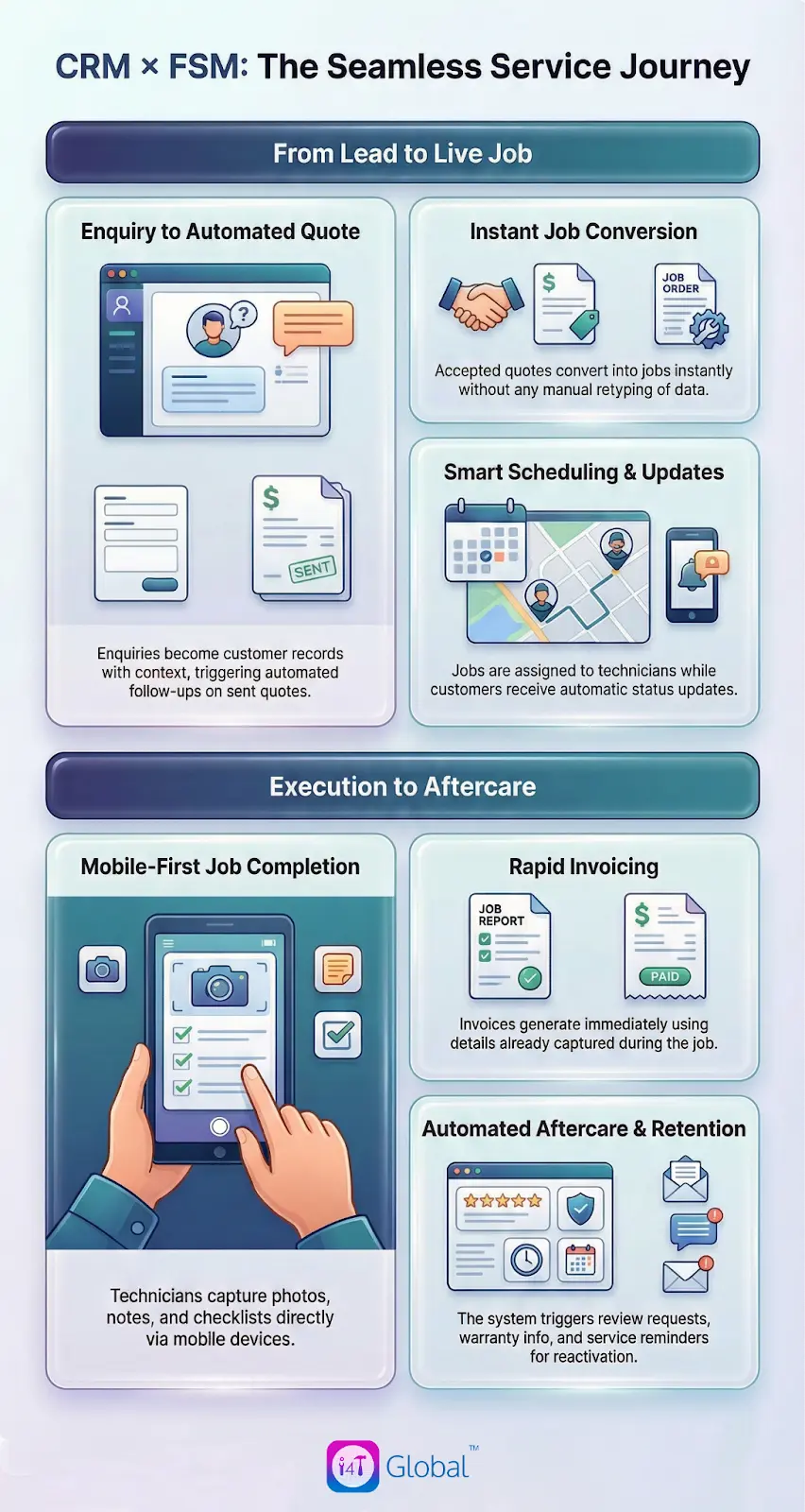
- To make CRM×FSM concrete, it helps to picture the full journey. In a connected system, the workflow typically runs like this:
- An enquiry comes in and becomes a customer record with site notes and context.
- A quote is created and sent, and follow-ups are triggered if the customer doesn’t respond.
- When the quote is accepted, it converts into a job without retyping anything.
- The job is scheduled and assigned, and the customer is automatically updated.
- The technician completes the job using mobile checklists, photos, and notes.
- The invoice is generated quickly because job details are already captured.
- Aftercare kicks in: review request, warranty info, service reminders, reactivation.
That’s one connected journey. It’s not about having more software. It’s about eliminating the dead space between steps
Real examples of CRM×FSM in the trades
For a plumber, FSM software with CRM can mean logging an urgent callout properly, dispatching the right person quickly, keeping the customer informed, capturing before/after photos, and issuing the invoice promptly. The aftercare piece matters too, because the customer who trusts you during a stressful callout is often the easiest customer to retain for future work.
For an electrician, the advantage often shows up in quoting and compliance. Quotes can be templated and followed up properly, accepted quotes convert into jobs instantly, and required documentation can be captured and stored against the job and customer. That reduces risk, reduces rework, and saves time later.
For HVAC, the workflow is often multi-stage: site visit, quote, install, commissioning, and ongoing service. CRM×FSM keeps that journey organised so nothing falls through, and it makes it much easier to build a servicing pipeline by automatically scheduling reminders based on what was installed and when.
What to look for in a CRM×FSM setup
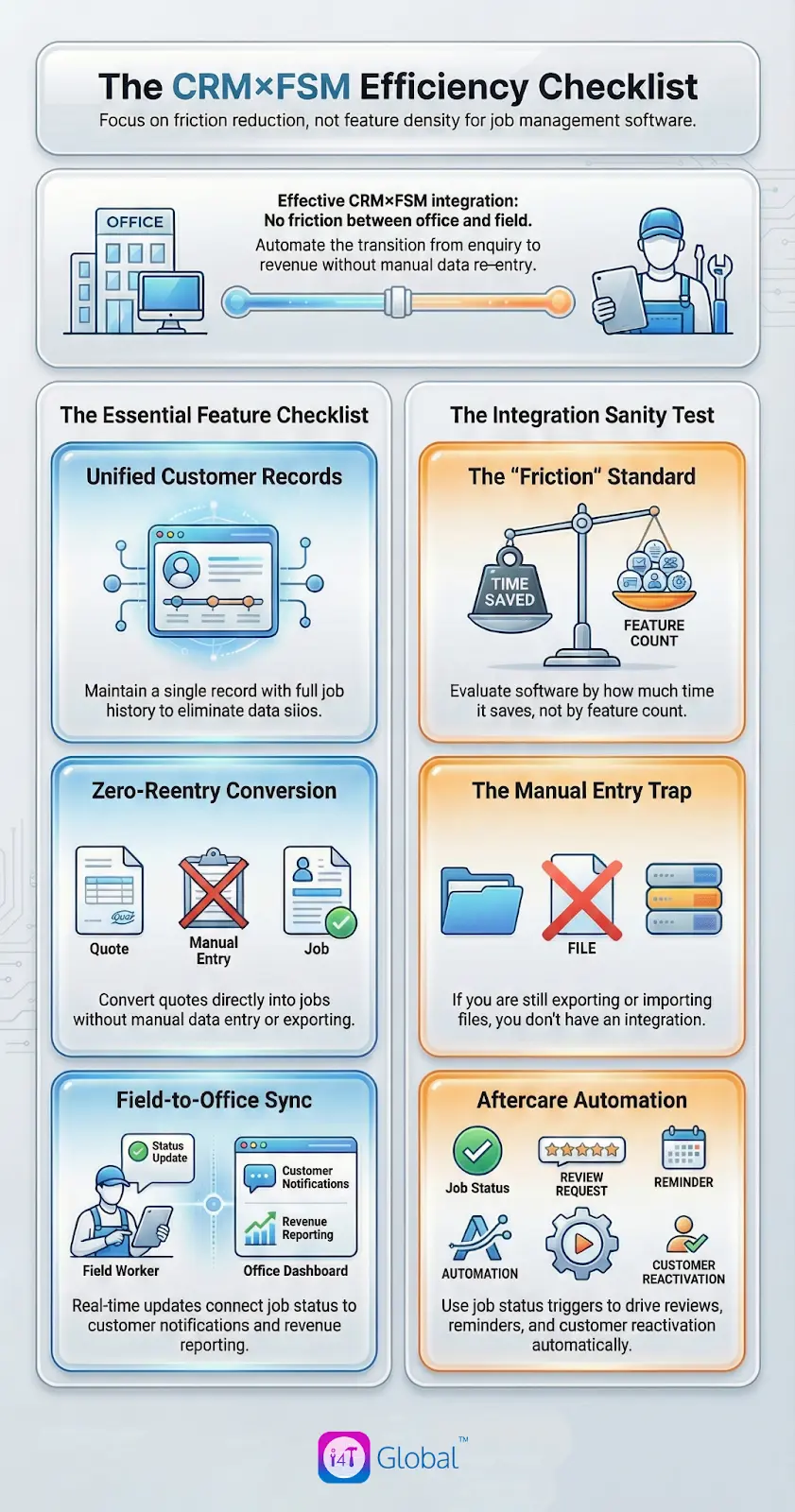
When you’re evaluating a job management CRM, the goal isn’t the most features. The goal is the least friction across the parts of the business that waste time or cost money.
Here’s the short checklist that usually matters most:
- A single customer record with full job history
- Quote-to-job conversion without re-entry
- Scheduling and dispatch that match real field operations
- A mobile technician experience that’s quick and practical
- Customer notifications driven by job status
- Aftercare automation (reviews, service reminders, reactivation)
- Reporting that connects enquiry to revenue and job outcomes
A quick sanity test: if the integration still involves exporting, importing, or recreating jobs manually, you’re not really getting CRM×FSM; you’re just running two systems side by side.
Common pitfalls
CRM×FSM works best when you keep the rollout practical.
One of the biggest mistakes is over-customising early. It’s better to get the core flow working: enquiry to quote to job to invoice to aftercare, and then refine templates, fields, and automations once the team is using it daily.
Another common problem is ignoring job statuses. Statuses aren’t just labels; they’re what drive automation, customer updates, and reporting. Keep them simple and consistent.
And finally, don’t forget the technician experience. If the mobile workflow is slow or annoying, the field team will avoid it, and you’ll end up back in manual phone call updates. The best CRM×FSM setups make it easier for technicians to do the right thing, not harder.
The bottom line
CRM×FSM matters in 2026 because field service businesses are being pulled in two directions at once: customers want faster response and better communication, while businesses need tighter operations and less admin to protect margins.
By connecting CRM and FSM into a single journey, you reduce handover gaps, speed up quoting and booking, improve the customer experience, and make aftercare consistent, which is where long-term growth often comes from.
How i4T Global supports CRM×FSM
At i4T Global, we deliver CRM×FSM through i4T Business (field service management) fully and seamlessly integrating with i4T CRM (customer relationship management). The goal is a joined-up workflow that runs from enquiry to aftercare, with shared customer records, job history, communication, and reporting across the full journey.
FAQs
CRM×FSM means combining CRM and FSM in one connected workflow so customer communication, quoting, scheduling, job delivery, invoicing, and aftercare all run on the same data.
If your business manages enquiries and quotes and delivers jobs in the field, both matter. CRM supports winning and retaining customers; FSM supports efficient job delivery.
Job management software is usually focused on scheduling and completing work (FSM). A CRM is focused on enquiries, customer history, follow-ups, and retention.
Yes. When booking confirmations and reminders are automated and tied to the schedule, customers are less likely to forget or miss appointments.
.
No. Small teams often benefit heavily because it reduces admin, improves follow-ups, and stops work from falling through the cracks.
Hot off the press!

Field Service Management sector operates, the i4TGlobal Team loves to share industry insights to help streamline your business processes and generate new leads. We are driven by innovation and are passionate about delivering solutions that are transparent, compliant, efficient and safe for all stakeholders and across all touch points.
Recent articles that may interest you as well..